# Comparing numbers
10 == 2
[1] FALSE# Comparing text (Case sensitive!)
"McGill" == "mcgill"[1] FALSEComparison operators are used to compare two values.
When you run a comparison, R evaluates the statement and returns a Logical value: either TRUE or FALSE.
Operator Name Example Plain English ==Equal to x == yIs x exactly equal to y? !=Not equal to x != yIs x different from y? >Greater than x > yIs x strictly larger than y? <Less than x < yIs x strictly smaller than y? >=Greater or equal x >= yIs x at least y or larger? <=Less or equal x <= yIs x at most y or smaller?
Logical operators allow you to combine multiple comparison statements into a single test. This is essential for complex data filtering.
Operator Description &Element-wise Logical AND operator. Returns TRUE if both elements are TRUE. |Element-wise Logical OR operator. Returns TRUE if one of the statements is TRUE. !Logical NOT. Returns FALSE if statement is TRUE; Reverses the result (TRUE becomes FALSE). %in%Contains/Membership. Checks if a value belongs to a set.
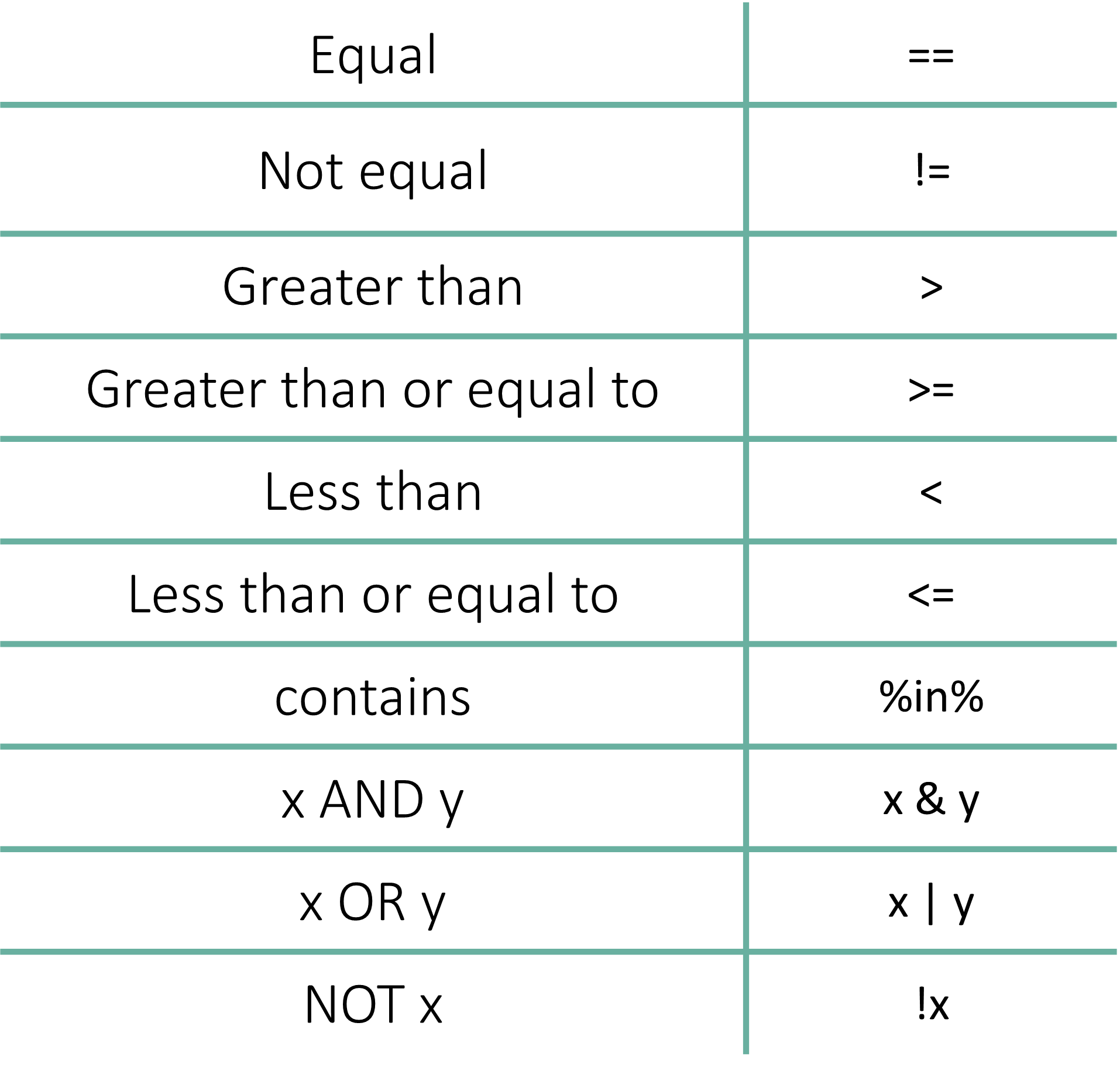
==In R, == is a logical operator for comparison. == asks: “Is A exactly equal to B?”
# Comparing numbers
10 == 2[1] FALSE# Comparing text (Case sensitive!)
"McGill" == "mcgill"[1] FALSEThe Most Common R Error: = vs ==
= (or <-) is for Assignment: You are telling R that a variable equals a value.
== is for Comparison: You are asking R if two things are equal.
Incorrect Demonstrations
Attempting to assign to a literal number
# ERROR: This sounds like you are trying to force the number 10
# to take on the value 2. R will block this.
10 = 2
Error in `10 = 2`:
! invalid (do_set) left-hand side to assignmentConfusing Variables with Text
# ERROR: This creates a NEW variable named McGill and stores "mcgill" in it.
# It does NOT check if they are the same.
McGill = "mcgill"

# To actually COMPARE them, you must use double equals and quotes for both:
"McGill" == "mcgill"
[1] FALSE!=In R, the exclamation mark ! stands for “NOT”. When combined with the equals sign, != checks if two values are different. != asks: “Is A different from B?”
TRUE if the values are not the same (are different).FALSE if they are the same (are not different).# Is 10 equal to 2? (False)
10 == 2[1] FALSE# Is 10 different from 2? (True)
10 != 2[1] TRUE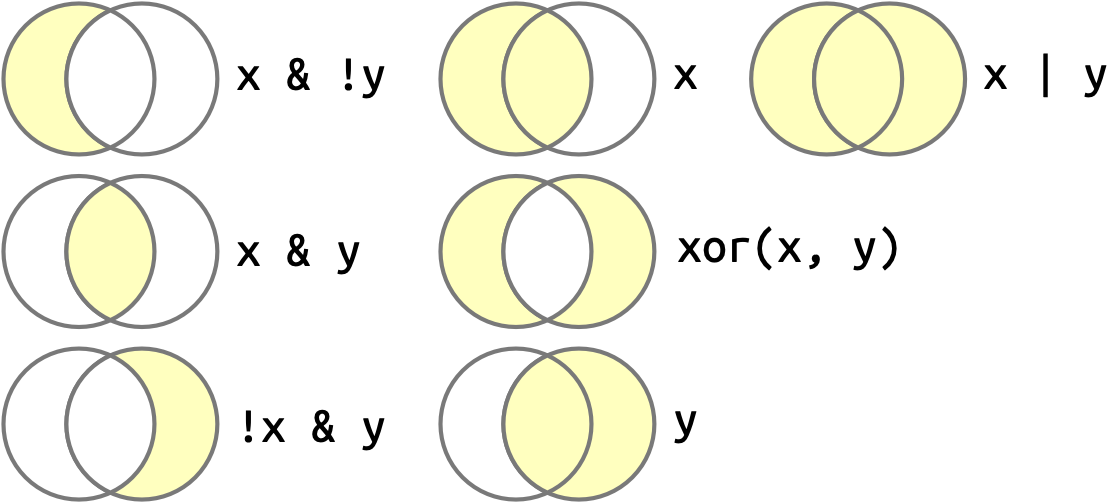
&The “AND” Operator (&): Use this when your condition must meet all criteria simultaneously.
age <- 65
bmi <- 32

# Is the patient over 60 AND obese (BMI > 30)?
age > 60 & bmi > 30
[1] TRUE|The “OR” Operator (|): Use this when meeting any one of the criteria is sufficient.
# Is the flower species either 'setosa' OR 'versicolor'?
species <- "setosa"
species == "setosa" | species == "versicolor"
[1] TRUEKeyboard Tip: How to type |?
Look for the key with the backslash \ (usually above the Return/Enter key).
Shift + \!The “NOT” Operator (!): This exclamation mark is used to reverse a logical value or exclude specific data points.
!TRUE[1] FALSEcontrol_group <- FALSE
# Is the sample NOT in the control group?
!control_group[1] TRUEThe %in% operator (often called “contains”) is extremely useful when you want to check if a value belongs to a large list or group.
Example: Searching for Genes Imagine you have a list of “Genes of Interest” for your diabetes research. You can check if a specific gene is in that list without writing many OR statements.
diabetes_genes <- c("INS", "GCK", "KCNJ11", "SLC30A8")

# Is 'INS' (Insulin) in our list?
"INS" %in% diabetes_genes
## [1] TRUE

# Is 'SOX2' in our list?
"SOX2" %in% diabetes_genes
## [1] FALSEand&&`?In R, you will sometimes see the double operator (&& and ||). While they look similar, they behave very differently under the hood:
| Operator | Type | Behavior | Best Use Case |
& |
Vectorized | Compares every element in a list. | Data Filtering (e.g., filtering a whole column of 1,000 patients). |
&& |
Control Flow | Only looks at the first element and ignores the rest. | if statements inside functions where you only expect one TRUE/FALSE. |
In this workshop (and for 90% of data analysis), you should always use the single & and |. The double versions are advanced tools used mostly by package developers to make code run slightly faster in specific scenarios.